
CSS stands for Cascading Style Sheets. CSS is one of the most important technologies used in web development for designing and styling websites. Many beginners ask what is CSS because it plays a major role in creating attractive, responsive, and user-friendly web pages.
HTML is used to create the structure of a webpage, while CSS is used to control the design, layout, colors, fonts, spacing, animations, and responsiveness of the website. Without CSS, websites would look plain and unorganized.
CSS helps developers improve the appearance of websites and create professional web designs. Modern websites use CSS extensively for responsive layouts, mobile optimization, animations, and interactive user interfaces.
History of CSS
CSS was introduced by Håkon Wium Lie in 1996. Before CSS, web developers used HTML tags for styling web pages, which made websites difficult to manage.
The introduction of CSS separated webpage structure from design, making websites easier to maintain and customize. Over time, CSS evolved with new versions such as CSS2 and CSS3, adding advanced features like animations, transitions, flexbox, grid systems, and responsive design tools.
What Is CSS?
CSS is a stylesheet language used to describe the presentation of HTML documents. It allows developers to style webpages by changing colors, fonts, layouts, borders, backgrounds, spacing, and responsiveness.
CSS basics are the foundation of modern web design and frontend development. CSS basics help developers style webpages using colors, layouts, spacing, fonts, animations, flexbox, and responsive design techniques. Beginners learning CSS basics can easily create attractive and mobile-friendly websites by combining CSS with HTML. CSS basics also improve website appearance, user experience, and responsive web layouts for modern browsers and devices.
CSS works together with HTML and JavaScript to create modern websites and web applications. HTML handles structure, CSS handles styling, and JavaScript handles interactivity.
CSS Basics for Beginners
CSS basics are essential for beginners who want to learn web design and frontend development. CSS basics help developers style webpages using colors, fonts, layouts, spacing, borders, animations, and responsive designs. Learning CSS basics makes websites visually attractive and improves the user experience on modern webpages.
CSS basics work together with HTML to create professional website designs. While HTML creates webpage structure, CSS basics control the appearance and layout of webpage elements. Developers use CSS basics to customize headings, paragraphs, buttons, images, navigation menus, and responsive layouts for different screen sizes.
Why CSS Basics Are Important
CSS basics are important because CSS helps developers create responsive and mobile-friendly websites. CSS basics allow websites to look professional, organized, and attractive across desktops, tablets, and smartphones. Many companies use CSS basics to improve website design, branding, readability, and overall performance.
Another advantage of CSS basics is that CSS reduces repetitive design work by using reusable styles and classes. CSS basics also support animations, transitions, flexbox, grid systems, and responsive web design techniques used in modern frontend development.
Popular CSS Basics Features
- Website styling
- Responsive layouts
- Colors and typography
- Flexbox and grid systems
- Animations and transitions
- Mobile-friendly design
- Custom webpage appearance
Why CSS Is Important
- Improves website appearance
- Creates responsive layouts
- Enhances user experience
- Separates design from structure
- Reduces repetitive code
- Makes websites mobile-friendly
- Supports animations and effects
Features of CSS
- Simple syntax
- Responsive design support
- Reusable styles
- Cross-browser compatibility
- Animation support
- Flexible layouts
- Improved website performance
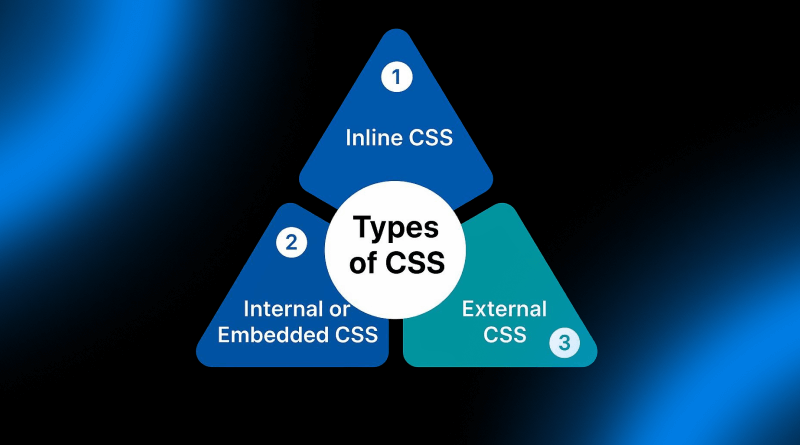
3 Types of CSS
There are mainly 3 types of CSS used in web development:
- Inline CSS
- Internal CSS
- External CSS
1. Inline CSS
Inline CSS is used to apply styles directly inside an HTML element using the style attribute. Inline CSS affects only a single element.
In the above example, the text color becomes blue using inline CSS.
Advantages of Inline CSS
- Quick styling
- Easy for testing
- Useful for small changes
Disadvantages of Inline CSS
- Difficult to manage large projects
- Repeats code
- Reduces maintainability
2. Internal CSS
Internal CSS is written inside the style tag within the head section of an HTML document. Internal CSS is used when styling a single webpage.
The above example changes all h1 headings to red color using internal CSS.
Advantages of Internal CSS
- Better organization
- Useful for single-page websites
- Easy to edit styles
Disadvantages of Internal CSS
- Cannot reuse across multiple pages
- Increases page size
- Less efficient for large websites
3. External CSS
External CSS is written in a separate CSS file and connected to HTML pages using the link tag. External CSS is the most commonly used method in modern web development.
The actual CSS styles are stored in a separate file:
Advantages of External CSS
- Reusable styles
- Easy maintenance
- Faster website management
- Cleaner HTML code
Disadvantages of External CSS
- Extra file loading
- May increase initial loading time
Difference Between 3 Types of CSS
| Feature | Inline CSS | Internal CSS | External CSS |
|---|---|---|---|
| Location | Inside HTML element | Inside style tag | Separate CSS file |
| Reusability | No | Limited | Yes |
| Best Use | Quick styling | Single page | Large websites |
| Maintainability | Low | Medium | High |
Basic CSS Syntax
CSS syntax contains selectors, properties, and values. The selector targets HTML elements, while properties define styles.
10 CSS Examples
1. Text Color
2. Background Color
3. Font Size
4. Border Example
5. Padding Example
6. Margin Example
7. Flexbox Example
8. Grid Example
9. Hover Effect
10. Animation Example
Applications of CSS
- Website styling
- Responsive web design
- Animations and transitions
- Mobile-friendly websites
- User interface design
- Landing pages
- Portfolio websites
- E-commerce websites
Advantages of CSS
- Cleaner HTML code
- Improved website speed
- Easy maintenance
- Responsive design support
- Reusable code
- Better user experience
Disadvantages of CSS
- Browser compatibility issues
- Complex debugging
- Different browser rendering
Popular CSS Frameworks
- Bootstrap
- Tailwind CSS
- Foundation
- Bulma
- Materialize CSS
Why Beginners Should Learn CSS
CSS is an essential skill for frontend web development. Beginners who learn CSS can create visually attractive websites and responsive user interfaces.
Understanding CSS also helps developers work with frameworks like Bootstrap and Tailwind CSS more effectively.
FAQs About CSS
1. What is CSS?
CSS is a stylesheet language used to style HTML webpages.
2. What are the 3 types of CSS?
The 3 types of CSS are Inline CSS, Internal CSS, and External CSS.
3. Why is CSS used?
CSS is used to design and style websites.
4. Is CSS easy to learn?
Yes, CSS is beginner-friendly and easy to understand.
5. What is external CSS?
External CSS stores styles in a separate file connected to HTML pages.
6. What is inline CSS?
Inline CSS applies styles directly inside HTML elements.
7. What is internal CSS?
Internal CSS is written inside the style tag of an HTML document.
8. Can CSS create responsive websites?
Yes, CSS is widely used for responsive web design.
9. What is CSS3?
CSS3 is the latest version of CSS with advanced styling features.
10. Which software is used for CSS?
Developers use editors like VS Code, Sublime Text, and Notepad++ for CSS coding.
Conclusion
Now you understand what CSS is and the 3 types of CSS used in web development. CSS helps developers create attractive, responsive, and modern websites by controlling webpage design and layout.
The three types of CSS include Inline CSS, Internal CSS, and External CSS. Each type has different applications, advantages, and limitations depending on the project requirements.
Learning CSS is important for anyone interested in frontend development, responsive web design, and professional website creation.