
Introduction
Programming often requires repeating the same action multiple times. Without loops, developers would need to write repetitive code, making programs longer, harder to maintain, and more prone to errors. Loops solve this challenge by allowing a block of code to execute repeatedly until a specified condition is met.
Understanding C Loops is one of the most important steps for beginners learning programming. Loops are used in calculations, data processing, game development, automation, embedded systems, and countless real-world software applications.
Developers use loops to process arrays, generate reports, validate user input, search records, and perform repetitive tasks efficiently. Strong loop knowledge improves problem-solving skills and helps programmers create cleaner, more scalable applications.
In this guide, you will discover seven smart techniques, practical coding examples, and professional insights that help you master loops and improve your programming logic.
What Are Loops in C?
Loops are control structures that repeatedly execute a block of code while a specified condition remains true. Instead of writing the same instructions many times, programmers define the logic once and allow the loop to handle repetition.
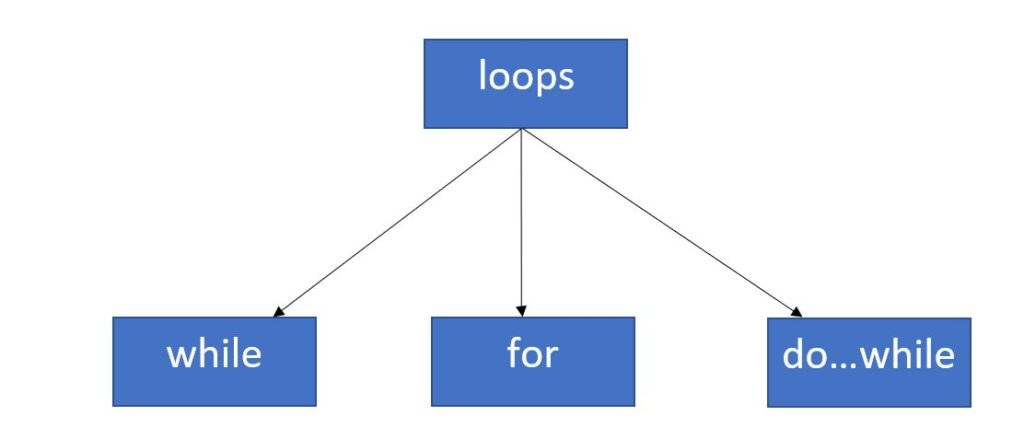
The three primary loop types available in C are:
- for loop
- while loop
- do-while loop
Mastering C Loops enables developers to build efficient solutions while reducing unnecessary code duplication.
Technique #1: Master the For Loop
The for loop is one of the most commonly used loop structures in C programming. It is ideal when the number of iterations is known before execution begins.
int main() {
int i;
for(i = 1; i <= 5; i++) { printf("%d\n", i); } return 0; }
Benefits of the For Loop
- Compact syntax
- Easy iteration control
- Simple debugging
- Widely used in algorithms
- Ideal for counting operations
Example 1: Print Numbers 1 to 10
This example demonstrates how a loop can replace multiple print statements with a single reusable structure.
Example 2: Multiplication Table
Multiplication tables are among the most common beginner exercises used to strengthen programming logic.
Technique #2: Use While Loops for Flexible Conditions
A while loop executes as long as a specified condition remains true. It is useful when the number of iterations is unknown before execution begins.
int main() {
int count = 1;
while(count <= 5) { printf("%d\n", count); count++; } return 0; }
Many real-world applications rely on C Loops based on user input or dynamic conditions that cannot be predicted in advance.
Example 3: Password Validation
printf(“Try Again”);
}
A login system may repeatedly request credentials until valid information is entered.
Advantages of While Loops
- Flexible execution control
- Ideal for unknown iteration counts
- Simple conditional processing
- Useful in interactive programs
Technique #3: Understand Do-While Loops
The do-while loop guarantees at least one execution before the condition is evaluated. This behavior makes it different from for and while loops.
int main() {
int num = 1;
do {
printf(“%d\n”, num);
num++;
} while(num <= 5);
return 0;
}
Understanding C Loops requires knowing when each loop type is appropriate. The do-while loop is valuable when at least one execution is mandatory.
Example 4: Menu-Driven Program
printf(“1. Add\n”);
printf(“2. Exit\n”);
} while(choice != 2);
Many console applications use menu systems that continue displaying options until the user chooses to exit.
Why Loops Matter in Programming
Loops are fundamental building blocks of software development. Almost every application performs repetitive operations, whether processing files, handling user input, generating reports, or analyzing data.
- Reduce repetitive coding
- Improve program efficiency
- Support automation
- Enable data processing
- Strengthen logical thinking
- Simplify algorithm design
- Increase maintainability
Developers who understand C Loops thoroughly can solve complex programming problems with cleaner and more efficient code.
“`html id=”g8l9xm”
Technique #4: Master Nested Loops
Nested loops are loops placed inside other loops. They are extremely useful when working with matrices, patterns, tables, multidimensional arrays, and data structures that require multiple levels of iteration.
Many advanced applications rely on C Loops working together through nested structures to process complex datasets efficiently.
int main() {
int i, j;
for(i = 1; i <= 3; i++) { for(j = 1; j <= 3; j++) { printf("* "); } printf("\n"); } return 0; }
Benefits of Nested Loops
- Pattern generation
- Matrix operations
- Table creation
- Grid processing
- Multidimensional data handling
Example 5: Square Star Pattern
****
****
****
This common programming exercise helps developers understand how multiple loops interact.
Example 6: Multiplication Matrix
Multiplication matrices demonstrate the power of nested iteration when processing tabular information.
Technique #5: Use Break Statements Wisely
The break statement immediately terminates a loop when a specific condition is satisfied. This helps improve performance by avoiding unnecessary iterations.
When to Use Break
- Search operations
- Input validation
- Early exit conditions
- Performance optimization
- Menu-driven programs
Understanding how to control execution flow is an important part of mastering C Loops.
Example 7: Search for a Number
printf(“Found”);
break;
}
Once the required value is located, the loop stops immediately instead of checking remaining elements.
Technique #6: Improve Logic with Continue Statements
The continue statement skips the current iteration and moves directly to the next loop cycle. It is useful when certain conditions should be ignored while processing data.
This example skips the value five while printing the remaining numbers.
Advantages of Continue
- Cleaner code
- Improved readability
- Efficient filtering
- Reduced nesting complexity
- Better condition handling
Example 8: Skip Even Numbers
This approach prints only odd numbers without creating deeply nested conditions.
Loop Optimization Techniques
Writing working code is important, but writing efficient code is even more valuable. Optimization helps programs execute faster and consume fewer resources.
1. Avoid Unnecessary Calculations
Move repeated calculations outside loops whenever possible.
for(i=0;i<100;i++) { printf("%d", total); }
2. Use Proper Loop Conditions
Ensure conditions are clear and efficient to avoid extra iterations.
3. Minimize Nested Structures
Deep nesting increases complexity and may reduce performance.
4. Exit Early When Possible
Using break statements can significantly improve efficiency in search-related operations.
Professional developers frequently optimize C Loops because efficient code performs better in production environments.
Common Loop Mistakes Beginners Make
Learning loops is exciting, but beginners often encounter common mistakes that lead to unexpected results.
- Infinite loops
- Incorrect c loops conditions
- Missing increment statements
- Off-by-one errors
- Improper nesting
- Variable scope issues
- Ignoring edge cases
Infinite Loop Example
printf(“Running…”);
}
This loop never stops because its condition is always true.
Debugging Loop Problems
Debugging skills are essential for every programmer. Understanding how loops behave helps identify logical errors quickly.
Debugging Tips
- Print variable values
- Check loop conditions
- Verify increment operations
- Test edge cases
- Use small datasets first
- Review nested structures carefully
Many programming issues can be resolved by tracing loop execution step by step.
Real-World Applications of Loops
Loops are used extensively in software development across many industries.
- Financial calculations
- Data analysis systems
- Game development
- Inventory management
- Artificial intelligence
- Machine learning preprocessing
- Embedded systems
- Automation tools
- Reporting applications
- Database processing
A strong understanding of C Loops helps developers create scalable solutions for these real-world challenges.
How Loops Improve Programming Logic
Programming is largely about solving problems logically. Loops encourage developers to think systematically about repetition, conditions, and data processing.
As programmers gain experience with C Loops, they develop stronger analytical skills that apply to algorithms, software architecture, and advanced programming concepts.
Mastering loop structures is one of the most important milestones in becoming a confident C syntax.