

PHP remains one of the most widely used server-side programming languages in the world. From personal blogs and business websites to large-scale web applications and eCommerce platforms, PHP powers millions of websites every day. While PHP is known for its flexibility and ease of use, developers often encounter issues that can interrupt application functionality and slow development progress.
Whether you are a beginner building your first dynamic website or an experienced developer maintaining enterprise applications, understanding error handling is essential. Errors can occur for many reasons, including syntax mistakes, incorrect variable usage, missing files, database failures, and incompatible code changes. Identifying these issues quickly can save countless hours of troubleshooting.
Learning how to handle php errors effectively is one of the most valuable skills a developer can acquire. Proper debugging techniques not only improve application reliability but also help create cleaner and more maintainable code. Developers who understand error management can resolve issues faster and prevent similar problems from occurring in future projects.
This comprehensive guide explores common PHP issues, explains why they occur, and demonstrates practical solutions that can be applied in real-world projects. You will also discover professional debugging strategies, coding best practices, and practical examples that help improve development efficiency.
What Are PHP Errors?
An error occurs when PHP encounters a problem that prevents code from executing correctly. Some errors stop script execution entirely, while others generate warnings or notices without terminating the application.
Errors provide valuable information about what went wrong and where the issue occurred. Reading error messages carefully can often reveal the exact file, line number, and cause of a problem.
Understanding php errors allows developers to diagnose issues systematically rather than relying on trial-and-error fixes. This structured approach reduces debugging time and improves software quality.
Why Error Handling Matters
Error handling is a critical aspect of modern web development. Ignoring errors can lead to broken functionality, poor user experiences, security vulnerabilities, and lost revenue. Effective error management helps developers identify issues before users encounter them.
Well-designed applications include mechanisms for detecting, logging, and resolving problems efficiently. Error handling also improves maintainability by making issues easier to diagnose when applications grow in complexity.
- Improves application stability
- Enhances user experience
- Simplifies troubleshooting
- Reduces downtime
- Supports long-term maintenance
- Improves security awareness
- Speeds up development workflows
Common Types of PHP Errors
PHP categorizes issues into different error types depending on severity and impact. Understanding these categories helps developers respond appropriately.
1. Parse Errors
Parse errors occur when PHP cannot understand the code structure due to syntax mistakes. These errors prevent scripts from running.
2. Fatal Errors
Fatal errors stop script execution completely. These issues often occur when required functions, classes, or files cannot be found.
3. Warnings
Warnings indicate problems that do not stop execution but may affect application behavior.
4. Notices
Notices typically highlight minor issues such as undefined variables or deprecated practices.
5. Deprecated Errors
Deprecated messages inform developers that certain features may be removed in future PHP versions.
Quick Fix #1: Resolve Syntax Errors Immediately
Syntax errors are among the most common issues developers encounter. These problems usually occur because of missing semicolons, unmatched braces, incorrect quotations, or improperly structured statements.
Even a single missing character can prevent an entire script from executing. Fortunately, PHP error messages typically identify the file and line where the issue occurred.
echo “Welcome to PHP”
?>
The code above produces a parse error because the semicolon is missing after the echo statement.
echo “Welcome to PHP”;
?>
Adding the semicolon resolves the issue immediately.
Example 1: Missing Semicolon
echo $name;
The missing semicolon after the variable assignment causes a syntax error.
Example 2: Missing Closing Brace
echo “Adult”;
The opening brace must have a corresponding closing brace to complete the code block correctly.
Many beginners encounter php errors related to syntax because small mistakes are easy to overlook during rapid development.
Quick Fix #2: Handle Undefined Variables Properly
Undefined variable notices occur when code attempts to access a variable before it has been initialized. While these notices may not stop execution, they can create unexpected behavior and make debugging more difficult.
A common best practice is to initialize variables before use and verify that expected data exists.
echo $username;
?>
This example generates a notice because the variable has not been defined.
$username = “Admin”;
echo $username;
?>
Defining the variable before use eliminates the notice.
Example 3: Form Data Validation
$email = $_POST[’email’];
}
Using isset() helps ensure data exists before accessing it.
Example 4: Default Variable Assignment
The null coalescing operator provides a fallback value when a variable is not defined.
Professional developers pay close attention to php errors involving undefined variables because these issues can create unpredictable application behavior and lead to difficult debugging sessions later.
Debugging Tips for Beginners
Developers often become frustrated when applications fail without clear explanations. Fortunately, PHP provides built-in tools that simplify debugging.
- Enable error reporting during development
- Read error messages carefully
- Check line numbers mentioned in reports
- Verify variable values regularly
- Use debugging functions when necessary
- Review recent code changes first
- Test features incrementally
ini_set(‘display_errors’, 1);
These settings help display detailed information during development, making it easier to identify and resolve issues quickly.
Understanding Error Messages Effectively
Many developers immediately search online for solutions without carefully reading error messages. However, error reports often contain everything needed to identify the root cause.
Typical error messages include:
- Error type
- Description of the issue
- File location
- Line number
- Stack trace information
Learning to interpret this information effectively can dramatically improve troubleshooting efficiency and reduce development delays.
In the next section, we will explore additional solutions including file inclusion issues, database connection failures, function-related problems, advanced debugging strategies, and six more practical examples used by professional developers.
Quick Fix #3: Solve Include and Require File Errors
File inclusion is one of the most common practices in PHP development. Developers use include and require statements to organize code into reusable files. While this approach improves maintainability, incorrect file paths frequently cause application failures.
When PHP cannot locate a requested file, warnings or fatal errors may occur depending on whether include or require is used. Understanding the difference between these statements is important for effective troubleshooting.
require “config.php”;
?>
If the specified file does not exist, execution stops immediately because require treats the missing file as a fatal issue.
include “config.php”;
?>
The include statement generates a warning but allows the script to continue executing.
Many php errors occur because developers move files between directories and forget to update file paths accordingly.
Example 5: Incorrect Relative Path
If the file is actually located inside a different directory, PHP will generate a file inclusion error.
Solution
Using __DIR__ creates a more reliable file reference and reduces path-related issues.
Best Practices for File Management
- Use absolute paths whenever possible
- Organize files into logical directories
- Avoid duplicate file names
- Use require_once for critical files
- Validate file existence before loading
- Maintain consistent folder structures
Proper organization significantly reduces debugging time and improves project maintainability.
Quick Fix #4: Resolve Database Connection Problems
Most modern PHP applications rely on databases for storing and retrieving information. When database connections fail, applications may become partially or completely unusable.
Connection failures typically result from incorrect credentials, unavailable database servers, firewall restrictions, or configuration mistakes.
$conn = mysqli_connect(
“localhost”,
“root”,
“password”,
“mydatabase”
);
?>
If any connection parameter is incorrect, the application may fail to communicate with the database.
Example 6: Invalid Database Credentials
“localhost”,
“admin”,
“wrongpassword”,
“shop”
);
Incorrect usernames or passwords are among the most frequent causes of database connection failures.
Improved Error Handling
die(“Connection failed: ” . mysqli_connect_error());
}
This approach immediately displays the reason for the connection failure during development.
Understanding how to troubleshoot php errors related to databases is essential because most dynamic websites depend heavily on database interactions.
Common Database Troubleshooting Steps
- Verify username and password
- Confirm database server availability
- Check database names carefully
- Inspect firewall settings
- Review hosting configuration
- Test connections independently
- Enable database logging
Following a structured troubleshooting process helps identify root causes quickly.
Quick Fix #5: Correct Function and Class Errors
Functions and classes help developers create modular and reusable code. However, referencing undefined functions or classes can result in fatal execution errors.
These issues often occur when files containing required definitions are not loaded properly or when names are misspelled.
calculateTotal();
?>
If the function does not exist, PHP generates a fatal error.
Example 7: Undefined Function
Calling a function before defining or including it causes execution to stop.
Correct Approach
return “Invoice Generated”;
}
echo generateInvoice();
Ensuring functions exist before use prevents unnecessary failures.
Example 8: Missing Class Definition
If the User class has not been loaded, PHP will generate a fatal class-not-found error.
Using Autoloading to Prevent Class Issues
Autoloading automatically loads classes when they are needed. This technique reduces manual file management and simplifies large applications.
include ‘classes/’ . $class . ‘.php’;
});
Autoloaders help maintain cleaner code and reduce the likelihood of missing class errors.
Advanced Debugging Techniques
As applications become larger, traditional debugging methods may no longer be sufficient. Professional developers often use advanced techniques to isolate and resolve issues efficiently.
These methods provide deeper insights into application behavior and help identify complex problems that may not be immediately visible.
- Step-by-step code execution
- Variable inspection
- Application logging
- Exception tracking
- Performance profiling
- Code reviews
- Automated testing
Example 9: Using var_dump()
“name” => “John”,
“role” => “Admin”
];
var_dump($user);
The var_dump() function displays detailed information about variables and is extremely useful during debugging sessions.
Example 10: Using print_r()
print_r($data);
This function provides a readable view of arrays and objects, helping developers understand application data structures.
Experienced developers use tools like var_dump(), print_r(), and structured logs to identify php errors quickly and accurately.
Professional PHP Coding Practices
Following coding standards reduces the likelihood of bugs and improves maintainability. Well-structured code is easier to understand, test, and debug.
- Use meaningful variable names
- Write modular functions
- Maintain consistent formatting
- Document complex logic
- Validate user input
- Handle exceptions gracefully
- Review code regularly
- Use version control systems
Strong development habits reduce technical debt and improve long-term project quality.
Understanding Error Reporting Levels
PHP provides multiple error reporting levels that allow developers to control what information is displayed or logged. These settings are particularly useful when transitioning applications from development to production environments.
Displaying all errors during development helps identify issues early and prevents hidden bugs from reaching production systems.
In production environments, error details should generally be logged rather than displayed directly to users for security reasons.
In the final section, we will cover advanced error handling strategies, exception management, logging systems, security considerations, performance optimization techniques, a detailed conclusion, and 10 SEO-friendly FAQs designed to improve user engagement and search visibility.
Advanced Error Handling Strategies
As applications grow larger, basic debugging methods become less effective. Professional developers often implement structured error handling systems that can identify, track, and resolve issues without interrupting the user experience. Advanced error handling helps maintain application stability even when unexpected situations occur.
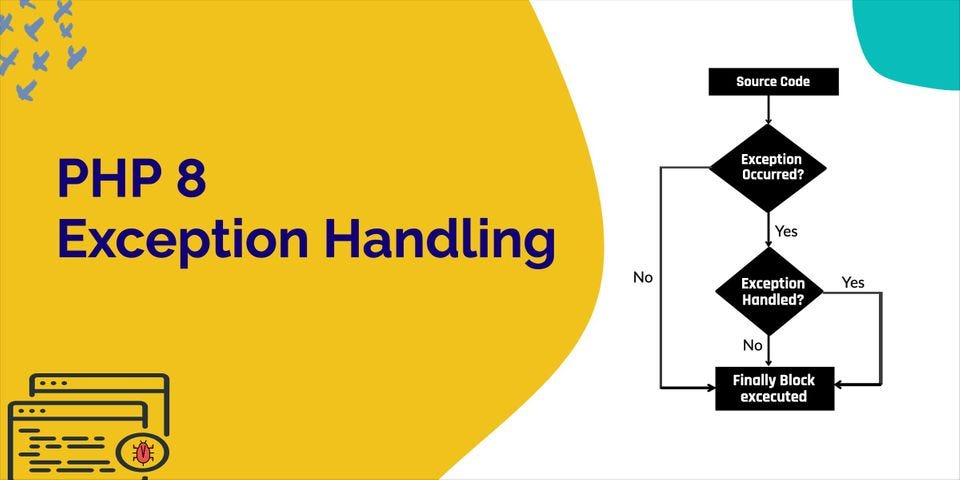
Instead of allowing scripts to terminate abruptly, developers can catch and manage problems gracefully. This approach improves reliability and makes troubleshooting significantly easier.
$result = 100 / 0;
} catch (Exception $e) {
echo $e->getMessage();
}
Structured handling methods help developers isolate problems while preventing complete application failures.
Many experienced teams use centralized monitoring systems to track php errors across multiple applications and servers.
Understanding PHP Exceptions
Exceptions provide a modern way to manage unexpected situations in applications. Instead of relying solely on warnings and fatal errors, developers can throw exceptions when specific conditions occur and catch them in a controlled manner.
if ($b == 0) {
throw new Exception(“Division by zero”);
}
return $a / $b;
}
This approach allows applications to continue functioning while providing detailed information about the issue.
- Improves application stability
- Provides cleaner code structure
- Simplifies troubleshooting
- Supports enterprise applications
- Reduces unexpected failures
Implementing Error Logging
Displaying technical messages directly to users is rarely a good practice in production environments. Instead, applications should store details in log files for later analysis.
Logging allows developers to review historical issues, identify recurring patterns, and investigate incidents without exposing sensitive information.
ini_set(‘error_log’, ‘logs/error.log’);
Once configured, PHP automatically records relevant information whenever issues occur.
Proper logging is one of the most effective ways to monitor php errors in live production environments.
Benefits of Error Logs
- Tracks historical issues
- Improves troubleshooting speed
- Supports security investigations
- Helps identify recurring bugs
- Provides production visibility
- Improves maintenance planning
- Assists team collaboration
Organizations that maintain detailed logs often resolve incidents much faster than those relying solely on manual debugging.
Security Considerations in Error Management
Error handling and security are closely connected. Detailed error messages may reveal sensitive information such as file paths, database structures, server configurations, or application logic.
While detailed messages are useful during development, they should not be displayed publicly in production environments.
log_errors = On
This configuration helps protect application details while still preserving valuable troubleshooting information in log files.
Reducing publicly visible php errors minimizes the risk of exposing technical information to unauthorized users.
Common Security Mistakes Developers Make
- Displaying database credentials in error messages
- Leaving debug mode enabled in production
- Ignoring warning messages
- Failing to validate user input
- Using outdated PHP versions
- Neglecting application logs
Avoiding these mistakes significantly improves overall application security and stability.
Performance Optimization and Error Prevention
Preventing issues is often more effective than fixing them later. Developers can reduce application failures by following coding standards, testing thoroughly, and optimizing performance.
Performance optimization and error prevention frequently go hand in hand. Cleaner code generally results in fewer bugs and more predictable behavior.
- Optimize database queries
- Reduce redundant code
- Use caching effectively
- Validate inputs consistently
- Monitor application performance
- Conduct regular code reviews
- Automate testing processes
A proactive approach helps reduce maintenance costs and improves long-term software quality.
Using Development and Production Environments Correctly
Professional development teams typically separate development and production environments. Development servers are configured to display detailed information, while production servers prioritize stability and security.
This separation allows developers to investigate issues safely without exposing sensitive technical details to users.
error_reporting(E_ALL);
ini_set(“display_errors”, 1);
}
Environment-specific configurations help teams maintain both productivity and security.
How Modern Frameworks Handle Errors
Many PHP frameworks provide built-in error handling systems that simplify troubleshooting. These frameworks often include logging tools, exception management, debugging dashboards, and automated reporting features.
Modern frameworks encourage structured development practices that reduce the frequency of php errors and improve application reliability.
Framework-level tools can save significant development time while helping teams maintain high coding standards.
Building a Reliable Debugging Workflow
A consistent debugging process helps developers identify and resolve issues more efficiently. Rather than making random code changes, successful developers follow a structured approach.
- Reproduce the issue consistently
- Review error messages carefully
- Identify affected files and functions
- Analyze recent code changes
- Test possible solutions
- Verify the final fix
- Document important findings
Following a repeatable process reduces frustration and increases troubleshooting efficiency.
Future Trends in PHP Development
PHP continues to evolve with improved performance, modern syntax enhancements, and stronger developer tools. New releases frequently introduce features that simplify development and improve application reliability.
Developers who stay current with language updates are better equipped to write maintainable and efficient applications.
- Improved performance optimization
- Enhanced type safety
- Better debugging capabilities
- Stronger framework ecosystems
- Expanded cloud deployment support
Keeping skills up to date helps developers build more robust applications and avoid common development pitfalls.
Conclusion
PHP remains one of the most powerful and widely adopted technologies for web development. While application issues are inevitable, understanding how to identify, troubleshoot, and prevent problems is essential for building reliable software.
Throughout this guide, we explored the most common challenges developers face, including syntax mistakes, undefined variables, file inclusion failures, database connection issues, and missing functions or classes. We also examined advanced debugging techniques, logging systems, exception handling strategies, and security considerations.
Mastering php errors allows developers to resolve issues faster, improve application quality, and create more stable user experiences. The ability to interpret error messages effectively and implement preventive measures is a valuable skill that benefits every project.
By applying the techniques discussed in this article, developers can reduce downtime, improve maintainability, strengthen security, and create applications that perform reliably in both development and production environments.
Frequently Asked Questions (FAQs)
1. What are PHP errors?
PHP errors are messages generated when PHP encounters problems during code execution, compilation, or runtime.
2. What is the difference between warnings and fatal errors?
Warnings allow scripts to continue running, while fatal errors stop execution completely.
3. How can I enable error reporting in PHP?
You can enable reporting using error_reporting(E_ALL) and ini_set(‘display_errors’, 1).
4. Why do undefined variable notices occur?
They occur when code attempts to use variables that have not been initialized or assigned values.
5. What causes parse errors?
Parse errors usually result from syntax mistakes such as missing semicolons, braces, or quotation marks.
6. Should errors be displayed in production?
No. Production systems should log errors instead of displaying detailed information to users.
7. What is exception handling in PHP?
Exception handling allows developers to manage unexpected situations using try, catch, and throw statements.
8. Why is error logging important?
Logging helps developers track, analyze, and resolve issues without exposing sensitive details publicly.
9. How can I prevent common PHP issues?
Follow coding standards, validate inputs, test thoroughly, use version control, and review code regularly.
10. What is the best way to learn PHP debugging?
Practice reading error messages, use debugging tools, analyze logs, and work on real-world projects to gain experience.

Post navigation
Previous Post
 React JS Components: 7 Smart Tricks Developers Love