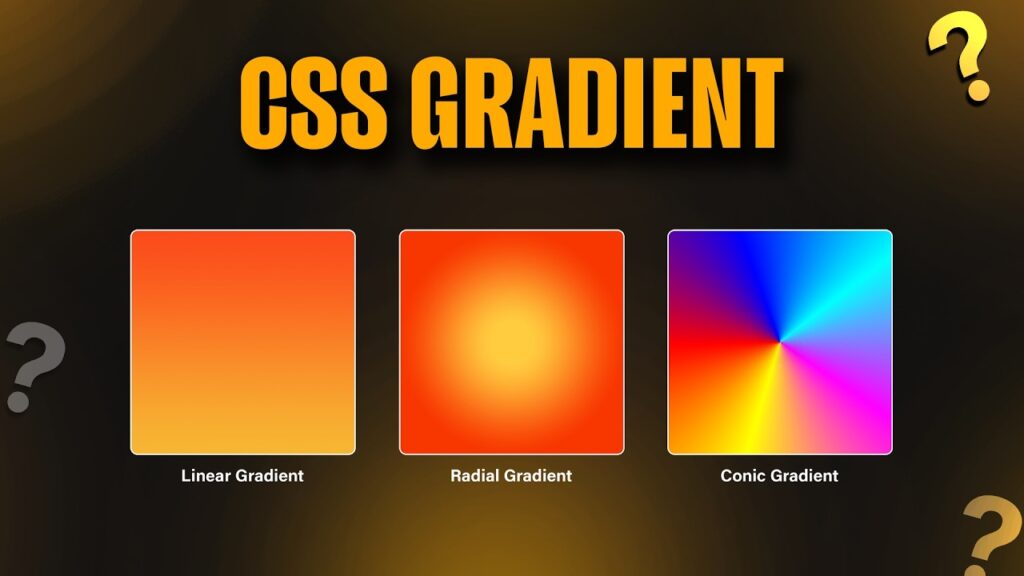

Modern websites demand visually engaging interfaces that capture user attention immediately. One of the most powerful tools available to front-end developers is css gradients. Instead of relying on flat backgrounds or heavy image assets, gradients allow designers to create smooth color transitions directly through css gradients. These effects improve aesthetics, reduce page weight, and help build modern user experiences.
Today, websites, applications, landing pages, portfolios, dashboards, and eCommerce stores use gradient effects extensively. Gradient backgrounds provide depth, improve branding, and make interfaces feel more professional. Whether you are a beginner learning web development or an experienced designer looking for advanced techniques, understanding css gradients is essential for creating visually appealing websites.
In this comprehensive guide, you will learn how gradients work, why they are valuable, how to implement them effectively, and how they contribute to modern user interfaces. You’ll also discover practical examples that demonstrate real-world implementations and best practices for achieving professional results.
Why Gradients Are Important in Modern Web Design
Web design has evolved dramatically over the years. Early websites relied heavily on solid colors and image-based graphics. Modern browsers now support advanced styling capabilities that allow developers to create beautiful visual effects without additional resources. Gradients are one of these capabilities.
They enable smooth transitions between multiple colors, creating a more dynamic appearance than traditional backgrounds. Because gradients are generated through css gradients, they load quickly and remain responsive across different devices and screen sizes.
- Improve visual appeal
- Reduce image dependency
- Enhance brand identity
- Improve user engagement
- Create modern interfaces
- Support responsive design
- Increase design flexibility
Understanding Gradient Fundamentals
Before exploring advanced techniques, it is important to understand how gradients function. A gradient represents a smooth transition between two or more colors. css gradients provides several gradient types, each designed for specific visual effects. Developers can customize angles, directions, color stops, transparency levels, and blending behavior.
Modern browsers support gradients natively, making them a reliable option for production environments. They can be used as backgrounds, overlays, buttons, text effects, cards, navigation bars, and hero sections.
Example 1: Linear Gradient Background
A linear gradient creates a transition along a straight line. This is the most commonly used gradient type and works exceptionally well for website backgrounds and hero sections.
background: linear-gradient(to right,#667eea,#764ba2);
height:300px;
}
This example creates a smooth transition from blue to purple. The result appears modern, elegant, and suitable for technology websites, startups, portfolios, and SaaS platforms.
Example 2: Vertical Gradient Design
Vertical gradients create a top-to-bottom transition. These are commonly used for banners, headers, and landing page sections where visual hierarchy is important.
background: linear-gradient(to bottom,#00c6ff,#0072ff);
height:250px;
}
The smooth vertical transition provides depth while maintaining readability for headings and call-to-action buttons.
Example 3: Diagonal Gradient Effect
Diagonal gradients introduce a sense of movement and energy. Many modern startup websites use diagonal transitions because they feel more dynamic than traditional horizontal designs.
background: linear-gradient(
45deg,
#ff512f,
#dd2476
);
}
This technique works particularly well for promotional pages and product showcases where visual excitement matters.
Example 4: Multi-Color Gradient Style
Multi-color gradients combine several shades into a single background. They are often used in creative portfolios, event websites, and entertainment platforms.
background: linear-gradient(
90deg,
#ff6b6b,
#feca57,
#48dbfb,
#5f27cd
);
}
This colorful transition produces a vibrant appearance that immediately attracts attention and encourages exploration.
Benefits of Using Modern Gradient Techniques
Design trends continue evolving, but gradients remain highly relevant because they combine beauty and performance. Unlike image backgrounds that require downloads, gradients are generated directly by the browser. This improves page speed while maintaining visual quality.
- Fast loading performance
- Responsive behavior
- Professional appearance
- Minimal resource usage
- Cross-browser support
- Easy customization
- Improved user experience
When combined with effective typography, spacing, and modern layouts, gradients can significantly elevate the quality of a website. Professional designers frequently use them to create memorable user experiences that stand out in competitive industries.
Best Practices for Professional Results
Successful gradient implementation requires thoughtful color selection and usability considerations. Colors should complement branding and maintain sufficient contrast for accessibility. Excessively bright combinations may distract users, while subtle transitions often provide a more refined appearance.
Always test gradient backgrounds across multiple devices and screen sizes. What looks excellent on a desktop monitor may appear different on mobile devices. Maintaining consistency ensures a better overall experience.
Example 5: Radial Gradient Background
A radial gradient starts from a central point and expands outward in a circular or elliptical pattern. This technique is useful when you want to draw attention to a specific area of a page. Designers often use radial gradients behind call-to-action buttons, featured content sections, or hero banners to create a focal point for users.
Unlike linear gradients that move in a straight direction, radial gradients radiate from the center. This creates a softer and more natural visual effect that works well for modern interfaces. The effect can be subtle or dramatic depending on the chosen colors and the size of the gradient.
background: radial-gradient(
circle,
#74ebd5,
#ACB6E5
);
height:300px;
}
This example creates a smooth transition that begins in the center and expands outward. The result feels modern and elegant while helping important content stand out.
Example 6: Gradient Overlay on Images
Images are often used as hero backgrounds, but text placed directly on top of images can become difficult to read. A gradient overlay solves this issue by adding a semi-transparent layer between the image and the content. This improves readability while maintaining the visual appeal of the image.
Gradient overlays are commonly used on landing pages, travel websites, portfolios, and marketing campaigns. They help establish visual hierarchy and create a more professional appearance.
background:
linear-gradient(
rgba(0,0,0,0.6),
rgba(0,0,0,0.2)
),
url(‘image.jpg’);
background-size:cover;
}
The dark overlay increases text visibility without hiding the image completely. This approach is widely adopted in professional web projects because it balances aesthetics and usability.
Example 7: Gradient Buttons
Buttons play a critical role in user interaction. A well-designed button can significantly improve click-through rates and user engagement. Gradient buttons provide depth and make interactive elements appear more attractive compared to flat designs.
Many modern SaaS platforms, mobile applications, and startup websites use gradient buttons to highlight important actions such as sign-ups, purchases, or downloads.
background:
linear-gradient(
to right,
#fc466b,
#3f5efb
);
padding:15px 30px;
color:white;
border:none;
border-radius:5px;
}
The smooth color transition helps the button stand out while maintaining a clean and modern design language.
Example 8: Gradient Borders
Traditional borders often look plain and outdated. Gradient borders provide a stylish alternative that adds sophistication to cards, containers, profile sections, and featured content blocks.
This technique is especially effective in modern UI systems where subtle visual details contribute to a premium user experience.
border:4px solid;
border-image:
linear-gradient(
45deg,
#00dbde,
#fc00ff
) 1;
}
The border displays a vibrant transition that immediately attracts attention without overwhelming the overall layout.
Advanced Gradient Techniques for Professional Websites
As design trends continue evolving, developers are discovering new ways to implement gradients creatively. Beyond backgrounds and buttons, gradients can be integrated into typography, cards, navigation menus, loading animations, and interactive user interfaces.
Professional websites often combine multiple gradient layers to create depth and realism. By carefully selecting complementary colors, designers can achieve sophisticated effects that strengthen branding and improve user perception.
Gradient Typography for Modern Branding
Typography is one of the most important visual elements on any website. Applying gradients to text can create striking headlines that immediately capture attention. This technique is commonly used by technology companies, creative agencies, and software startups.
background:
linear-gradient(
90deg,
#ff9966,
#ff5e62
);
-webkit-background-clip:text;
-webkit-text-fill-color:transparent;
}
Gradient typography should be used selectively for major headings and featured content. Overusing this effect may reduce readability and visual impact.
Creating Visual Depth with Layered Gradients
Layering multiple gradients is an advanced design strategy that can produce highly sophisticated results. Instead of relying on a single transition, designers combine several gradient layers to simulate lighting, depth, and texture.
These layered effects are particularly useful in dashboard interfaces, application designs, and premium landing pages where visual quality influences user trust and engagement.
background:
linear-gradient(
120deg,
rgba(255,255,255,0.1),
rgba(255,255,255,0)
),
linear-gradient(
45deg,
#667eea,
#764ba2
);
}
The result is a polished design that feels more dimensional and visually appealing than standard flat backgrounds.
Using Gradients in Card Components
Card-based layouts have become a standard design pattern across modern websites and applications. Applying subtle gradients to cards can create distinction between content sections while maintaining consistency throughout the interface.
Gradient cards work especially well for pricing sections, service listings, testimonials, and featured products. When paired with proper spacing and typography, they can dramatically improve visual presentation.
background:
linear-gradient(
135deg,
#89f7fe,
#66a6ff
);
padding:30px;
border-radius:15px;
}
This approach creates a clean and modern appearance that enhances the overall quality of the user interface.
Common Gradient Mistakes to Avoid
Although gradients can improve design quality, improper implementation may negatively affect usability and visual consistency. Developers should avoid selecting random colors without considering brand identity and accessibility requirements.
- Using too many bright colors together
- Creating insufficient text contrast
- Overusing gradients throughout the layout
- Ignoring accessibility guidelines
- Using clashing color combinations
- Failing to test on mobile devices
- Applying effects without design purpose
The most effective designs use gradients strategically rather than excessively. Subtle implementation often produces better results than dramatic visual effects.
Performance Advantages of css gradients-Based Visual Effects
One of the biggest advantages of gradients is performance. Since browsers generate gradients directly through code, there is no need to download large image files. This reduces page size and helps improve loading speed.
Faster websites generally provide better user experiences and can contribute positively to search engine visibility. Lightweight visual elements also improve responsiveness on mobile devices and slower network connections.
For businesses and content creators, improved performance can lead to better engagement, lower bounce rates, and higher conversion rates. Modern development practices increasingly prioritize efficient design techniques, making gradients a valuable tool in contemporary web projects.
Choosing the Right Color Combinations
Color selection plays a major role in gradient effectiveness. Successful combinations typically include colors that naturally complement one another. Cool tones create professional and calming interfaces, while warm tones generate excitement and energy.
Brands should choose combinations that align with their identity and target audience. Consistency across pages helps strengthen recognition and creates a cohesive visual experience.
- Blue and purple for technology brands
- Orange and pink for creative agencies
- Green and teal for environmental projects
- Black and gray for luxury brands
- Blue and cyan for SaaS products
Thoughtful color planning ensures that gradients enhance design quality rather than becoming a distraction.
Future Trends in Gradient Design
Modern design trends continue embracing gradients because they offer flexibility, scalability, and visual sophistication. As browser technologies advance, designers are exploring more complex effects that combine gradients with animations, glassmorphism, and immersive user experiences.
Interactive gradients, animated transitions, and dynamic color systems are becoming increasingly popular. These innovations enable websites to feel more engaging while maintaining excellent performance characteristics.
Organizations that adopt contemporary design techniques can create stronger first impressions and provide memorable experiences that encourage visitors to explore further.
Example 9: Animated Gradient Background
Animated gradients have become increasingly popular in modern website design because they add movement without requiring heavy video files or complex JavaScript libraries. A subtle animation can make a website feel alive and interactive while maintaining excellent performance. Businesses often use animated backgrounds in hero sections, product showcases, and landing pages to create a memorable first impression.
When implementing animations, moderation is important. Fast-moving animations can distract users and negatively affect usability. Smooth transitions that move gradually across the screen typically provide the best experience. They add visual interest without drawing attention away from the primary content.
background: linear-gradient(
-45deg,
#ff6b6b,
#feca57,
#48dbfb,
#5f27cd
);
background-size:400% 400%;
animation:gradientMove 10s ease infinite;
}
@keyframes gradientMove{
0%{background-position:0% 50%;}
50%{background-position:100% 50%;}
100%{background-position:0% 50%;}
}
This effect continuously shifts the gradient position, creating a dynamic and professional appearance that works particularly well for modern digital products and startup websites.
Example 10: Glassmorphism Gradient Card
Glassmorphism remains one of the most influential UI trends in recent years. Combining transparency, blur effects, and gradients creates a sophisticated visual style that feels modern and premium. Many software applications and dashboards use this technique to create depth while maintaining a clean interface.
The key to successful glassmorphism is subtlety. Excessive transparency or overly bright colors can reduce readability. A balanced combination of blur and gradient effects creates an elegant user experience that feels contemporary and polished.
background:
linear-gradient(
135deg,
rgba(255,255,255,0.25),
rgba(255,255,255,0.05)
);
backdrop-filter:blur(10px);
border-radius:20px;
padding:30px;
border:1px solid rgba(255,255,255,0.2);
}
This design pattern is frequently used in dashboards, profile pages, premium product interfaces, and modern application layouts.
How Gradients Improve User Experience
css gradients Visual design plays an important role in how visitors perceive a website. Attractive interfaces encourage users to stay longer, explore additional content, and engage with calls to action. Gradients contribute to this process by creating depth, guiding attention, and supporting visual hierarchy.
css gradients A carefully designed gradient can subtly direct users toward important sections without requiring intrusive design elements. For example, a bright focal point near a call-to-action button naturally attracts attention and encourages interaction.
css gradients Modern users expect polished interfaces. Websites that appear outdated or visually inconsistent may struggle to establish trust. Thoughtful implementation of gradient effects can significantly enhance the overall perception of professionalism and quality.
Business Benefits of Modern Gradient Design
Organizations invest heavily in branding and user experience because these factors influence customer behavior. Modern visual design helps companies stand out in competitive markets and strengthens brand recognition.
- Creates stronger first impressions
- Enhances visual branding
- Improves engagement metrics
- Supports conversion optimization
- Improves perceived product quality
- Encourages longer session duration
- Strengthens overall user experience
Businesses that focus on both functionality and aesthetics often achieve better user satisfaction. Effective design is not merely decorative; it supports communication, usability, and brand identity.
SEO Benefits of Modern Visual Design
Although search engines primarily evaluate content quality and technical performance, design indirectly influences rankings through user behavior signals. Attractive layouts encourage visitors to spend more time on a website, explore additional pages, and engage with content.
Because gradients are generated through css gradients rather than image files, they contribute to lightweight page construction. Faster page loading speeds can improve user experience and support technical optimization efforts. Modern design combined with valuable content creates a stronger overall website experience.
Website owners should remember that visual appeal alone is not enough. Quality content, accessibility, responsive layouts, and technical optimization must work together to achieve long-term success.
Frequently Asked Questions
1. What are CSS gradients?
Gradients are smooth transitions between two or more colors created directly through css gradients. They can be used for backgrounds, buttons, text effects, cards, and other interface elements.
2. Are gradients better than image backgrounds?
In many cases, gradients offer better performance because browsers generate them directly without requiring additional image downloads.
3. Which gradient type is most commonly used?
Linear gradients are the most popular because they are simple, flexible, and suitable for a wide variety of design scenarios.
4. Do gradients work on mobile devices?
Yes. Modern browsers fully support gradient effects across desktop, tablet, and mobile devices.
5. Can gradients improve website performance?
They can help reduce dependency on image assets, which may contribute to smaller page sizes and faster loading times.
6. What colors work best together?
Complementary colors that align with brand identity generally produce the best results. Testing different combinations is recommended.
7. Can I animate gradients?
Yes. css gradients animations can be used to create moving gradient effects that add subtle visual interest to modern interfaces.
8. Are gradients suitable for professional websites?
Absolutely. Many leading technology companies, software platforms, and digital agencies use gradient-based design systems.
9. Should gradients be used everywhere?
No. Strategic implementation usually delivers better results than excessive use throughout an entire website.
10. Are gradients still popular in 2026 and beyond?
Yes. They remain a major component of modern web design trends because they combine visual appeal, flexibility, and strong performance.
Final Thoughts
Modern web design continues evolving, but gradients remain one of the most effective tools available to developers and designers. From simple backgrounds to advanced glassmorphism effects, gradients provide endless opportunities for creating engaging user experiences. They are lightweight, responsive, customizable, and visually appealing, making them an essential part of contemporary design systems.
By understanding gradient fundamentals, choosing effective color combinations, and applying best practices, developers can build interfaces that look professional and perform exceptionally well. Whether creating a portfolio, business website, SaaS platform, online store, or creative project, gradients offer a powerful way to enhance visual presentation and strengthen user engagement.
The examples presented throughout this guide demonstrate how versatile gradient techniques can be. Experiment with different directions, color combinations, overlays, typography styles, animations, and card designs to discover unique solutions that align with your brand and project goals. Consistent practice and thoughtful implementation will help transform ordinary layouts into memorable digital experiences.